
Microsoft Teams: Removing Copilot from the chat list
Updated: Sep 24
MC1477999
What and why
To provide a more consistent and streamlined Microsoft 365 Copilot experience in Microsoft Teams, we are simplifying how users access Copilot in Teams.
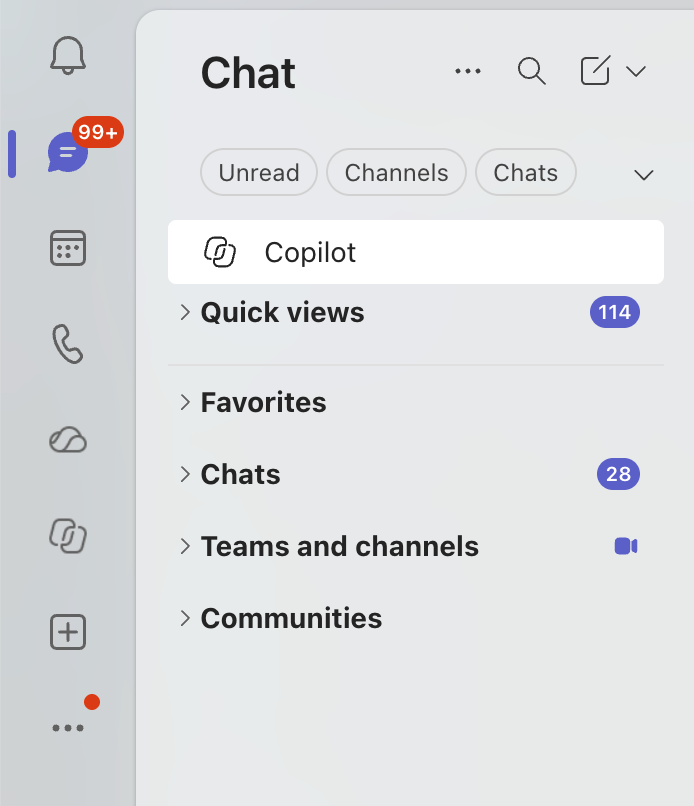
Today, users can access Copilot either from the Teams chat list or from the Copilot app in the Teams app bar. Beginning in October 2026, we will remove the Copilot entry point from the Teams chat list and direct users to access Copilot through the Copilot app. The Copilot app provides access to the full set of Copilot capabilities, while the chat list entry point provides a more limited experience.
This change creates a single, consistent access point for Copilot in Teams, helping users discover and return to Copilot more easily while reducing interface clutter. To help users transition, a coachmark will direct users from the chat list entry point to the Copilot app before the chat list entry point is removed.
Rollout schedule
Copilot chat list entry point removal (Worldwide, GCC): Beginning mid-October 2026 and expected to complete by late-October 2026
Impact on your organization
Who is affected
Organizations whose users access Microsoft 365 Copilot in Microsoft Teams
Users of Microsoft Teams desktop and web applications who currently access Copilot from the Teams chat list.
Mobile users are not affected.
Platforms and services
Microsoft Teams desktop
Microsoft Teams web
What will happen
The Copilot entry point in the Teams chat list will be removed.
Prior to the mid-October removal, users who access Copilot from the chat list will see a coachmark directing them to the Copilot app.
The Copilot app in the Teams app bar will remain available and unchanged.
If the Copilot app has been unpinned from the Teams app bar, users will be directed to the app overflow menu where they can locate the Copilot app.
Existing Copilot conversations, notifications, supported deep links, and session continuity will continue to work.
No user conversations, prompts, chat history, or Copilot data will be removed.
Mobile experiences are unchanged.
This change is enabled by Microsoft and does not require tenant configuration.
Before:
After:

Copilot icon in the menu rail:

Action required and recommendations
No action is required.
We recommend that administrators:
Inform users that Copilot in Teams will be accessed through the Copilot app in the Teams app bar going forward.
Update internal training materials, screenshots, adoption content, and support documentation that reference the Copilot chat list entry point.
Notify help desk and support teams before rollout.
Review Teams app setup policies and consider pinning the Copilot app for users if it is not already pinned.
Monitor user feedback after rollout and direct users to the Copilot app if they are looking for the retired chat list entry point.
Compliance considerations
No compliance considerations identified, review as appropriate for your organization.

